Optional Grant Fix
Since the transition, there has been a bug (now fixed) that did not allow you to add some optional grants retroactively to an enrollment. If your program is funded by a grant that is not automatically applied to all your clients at enrollment, and the optional grant is not a Minnesota Housing or DHS grant, this newsletter article is for you.
To add a grant to an existing enrollment now, you would select the Edit Project Entry Workflow option from the three dots (action menu) next to the enrollment.
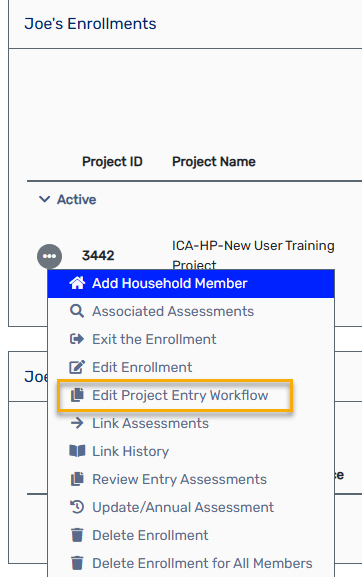
Then, select any state or local grants that apply to the client's enrollment from the Select any additional State or Local Grants field. Grants listed under Grants automatically attached to this program are assigned automatically and do not need to be selected.

You will need to go through the workflow, as there may be questions that were not required by the original grants, but are required for the new grants. Make sure to click the gray Finish button when complete.
Note: If you don’t see the grant you are looking for, and the enrollment start date is within the time frame that the grant should be available, reach out to ICA through the Helpdesk.