Big Client Record Deduplication Effort Coming Feb. 26
ICA staff will be coming together on February 26th to work through a long list of duplicate client records and submit them for merging. Depending on the size of the final merge list, it may take several days for the system to process every request, and over that time period users may find that records they are familiar with have been combined with other records.
What do I need to know?
Only records that have an exact match on First Name, Last Name, Birth Date, and Social Security Number will be merged.
Client records that have been used most recently will be kept.
Owing to the high volume of merges, notifications will not be added to remaining records post-merge.
How will I know if a client’s record was merged?
If you can’t find a client using their usual ID number or by scanning their Community Card, try our Find Merged Client’s New ID tool! It’s located under the Data Checker folder in the Home workspace.
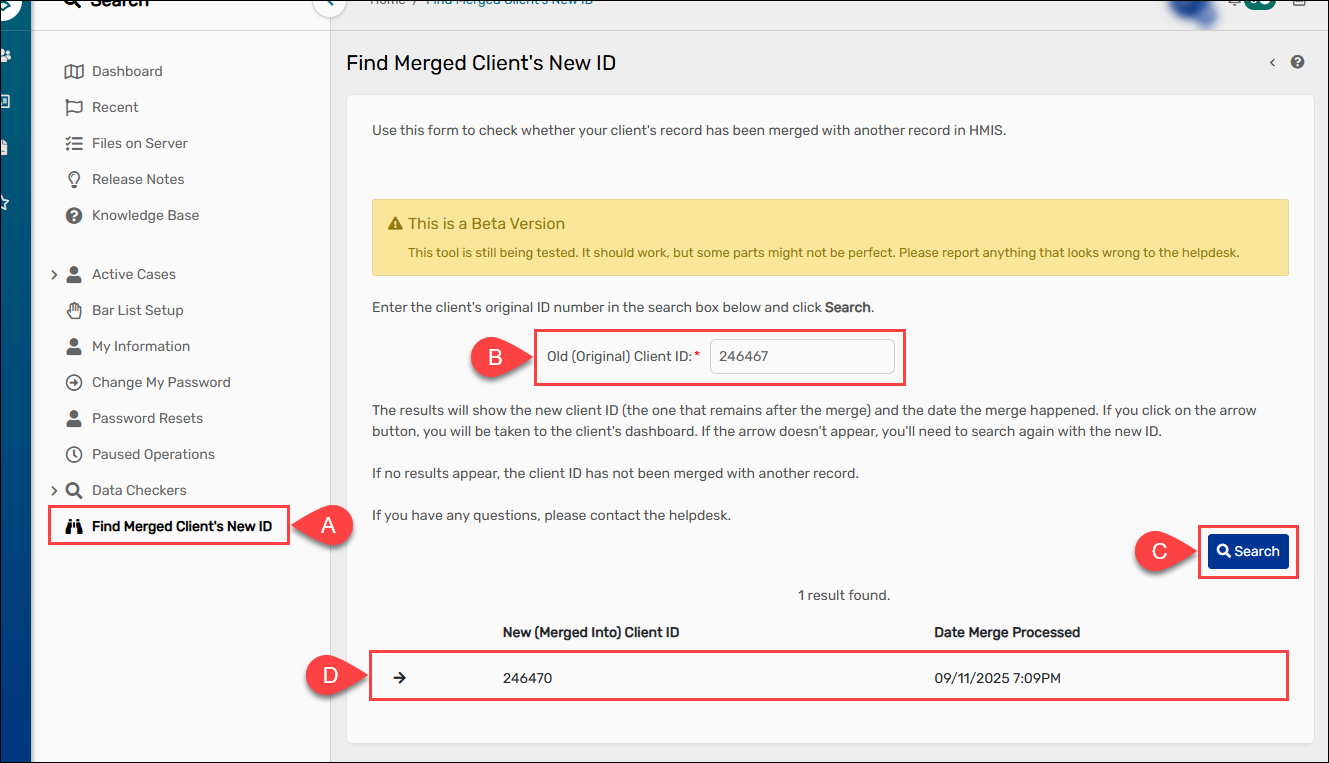
To find a client record’s new ID number, select the Find Merged Client’s New ID form (A). Once there, enter the client’s original ID (B) and select “Search” (C). The client’s new ID will then appear in the search results section (D).
How can I help?
Always search the system carefully before adding a new client to make sure you don’t create a duplicate record. If you think a client has more than one record, email their ID numbers to the Helpdesk at mnhmis@icalliances.org. The Helpdesk team will review them and let you know if the records can be merged.
Please don’t go looking for duplicate records on purpose! While merging duplicates helps improve data quality, the process is done manually and takes time. Only contact ICA if you discover that a client you are currently serving appears to have more than one active record in HMIS.