Changes Coming to How You Log Into HMIS
Starting December 15, our software vendor (Caseworthy) is updating Minnesota’s HMIS login system to make it more secure and easier to use. The switch happens late in the evening on December 14.
What is changing:
One login for both sites: If you use both the live HMIS site and the training site, you will now use the same username and password for both.
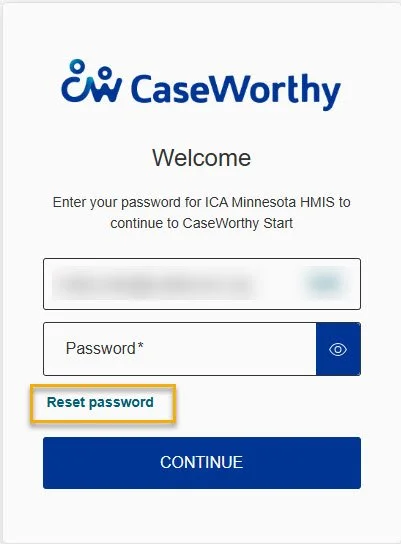
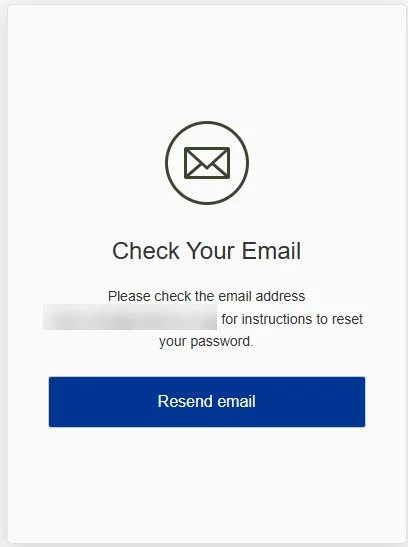
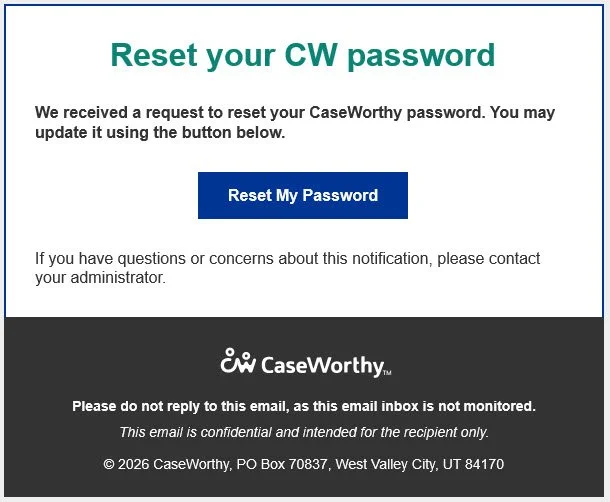
Self-service password resets: Supervisors and the HMIS Helpdesk can no longer reset your password for you. Instead, click the "Reset Password" link on the login screen to get an automated reset email. (Note for agencies: Ask your IT team to allow emails from no-reply@mail.id.caseworthy.net so these messages don't go to spam.)
90-day password updates: You will be required to update your password every 90 days.
What is staying the same:
Your current login info: You will still use your existing live-site username and password after the update.
Website links: The web addresses (URLs) for both the live and training sites will stay the same.
Inactivity lockouts: If your account gets locked because you haven't logged in for a while, you will still need to contact the HMIS Helpdesk to unlock it.
Day-to-day work: How you enter data and run reports in HMIS will not change.
Optional Multi-Factor Authentication (MFA): You can still choose to set up MFA on your account if you'd like extra security.
We are committed to making this transition as smooth as possible. Keep an eye out for written instructions and a video walkthrough as we get closer to December 15.